The Power of Tickets
Creating a ticket for your event with Good Show couldn’t be simpler. We have a very flexible ticketing tool that can be used in a multitude of ways to suit your needs in a matter of minutes. In this blog we go into just how felxiable the ticketing system on Good Show really is. We also have some fantastic tips covering private ticket links that some of our clients call game changers, and have actully helped boost ticket sales!
The Ticketing Tool
Its simple but powerfull. You can name your ticket anything like: Standing, General admmssion, Balcony, Mezzanine, Unreserved seating, Table of 2,3,4 the possibilties are endles. You can add as many tickets as you need within the same event, there is no need to create multiple events.

On each ticket you have the following options:
- On sale/off sale date and times. Is the show being announced but tickets are going on sale a different time and date? This can all be scheduled in advance, that's where this option is super handy. If you want some more info on event set up click HERE
- Ticket face value (Value), Total No of available tickets (Total) and Max amount of tickets per person (MAX PP)
- Add a more detailed description of the ticket, in case you feel there needs to be some extra information in there for buyers.
- Make a private ticket. Private links generate their own link to be shared with a closed audience. Private tickets are always hidden from public tickets and will not appear on your Good Show event from the main ticket link. The only way to access a private ticket is via the link generated by the private ticket. It will also be the only ticket shown on that link.
How to use a private/hidden ticket?
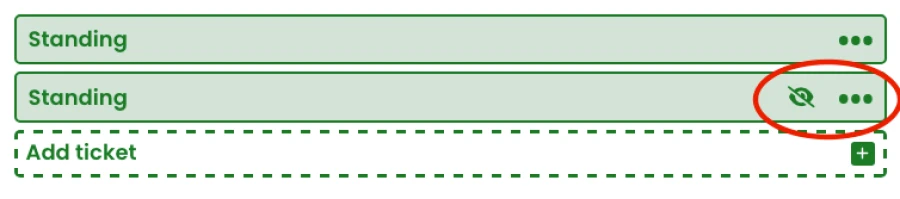
In the example below, multiple tickets have been created within one event. The first is a general standing ticket available to the public when they follow the ticket link to your Good Show event. The second ticket is a private ticket. The private link is represented by the icon within the red circle; click on the three dots to reveal the 'Copy Private Link'.
There are endless ways to use a private/hidden ticket link. Doing a few of the below can actully boost your ticket sales. Here are just a few creative ways of using the feature:
- Pre-sale tickets for your mailing list followers - A popular use of the private link is to send out early access tickets to your customer mailing list, making your loyal customers feel extra loved!
- Discounted, Special offers or 'members' tickets - Some of our customers run members clubs or run special offers. You can send the private link for discounted tickets direct to your members list by email, or perhaps share the link in a facebook group.
- Artist guestlist - No more hastily hand written lists 20 minutes before doors! Send the performers a small gueslist allocation in advance, take the stress out of last minute guestlists.
- Tracking artist sales - Got a multi artist event and want to track how much promotion each performer is doing? Give each artist their own private link to use for their promo, this way you can see how many tickets they’ve sold from their allocation
These are just a few ways we’ve seen hidden tickets used, sometimes all within one event!